

The hidden cost of the multiple model stack
Enterprise workflows process information the way people actually produce it. A compliance analyst doesn’t summarize a regulatory call in plain text before reviewing it, she watches a recording, reads a document, and forms a judgment across both. A maintenance engineer doesn’t transcribe a sensor alert before cross-referencing it with equipment imagery, he sees and hears everything at once.
The multiple model approach of stitching together specialist models for each modality, text, video, image and audio looks manageable on a whiteboard: route audio to Whisper, images to a vision model, PDFs to an embedding pipeline, and feed everything into the LLM as text. In practice, every handoff adds latency. A cascaded pipeline adds 300–600ms of sequential overhead before the reasoning model receives its input; a unified model adds roughly 50–100ms for the same combination. For agentic systems operating in real time, triaging a support call, screening a document queue, that gap often determines whether a product meets its SLA.
Errors compound too. A noisy transcription step produces degraded input the downstream LLM can't fully recover from, and debugging that failure across three model APIs and three logging pipelines is costly. Beyond cost and latency, there is a capability gap pipelines can't fully close: cross-modal reasoning. A model holding audio and video in one context window can ground spoken language against visual content natively, for example correlating what was said on a call with what was on screen, in a way a pipeline that produces two separate text outputs structurally cannot.
How multimodality can elevate agentic AI
Multimodal models bring breadth to automated workflows. A single model that processes video, audio, images, and text together can watch a customer support call and surface the exact moment sentiment shifted, read a contract image and extract structured data without a separate OCR step, or analyze a manufacturing recording and flag anomalies against a maintenance log, all within one context window or one reasoning loop. For enterprise AI teams, that means dramatically faster workflows, fewer integration points to maintain, and agents that can reason over the full richness of enterprise data rather than a text-only approximation of it.
An agent that can only perceive text must rely on a preprocessing layer to decide what visual or audio information is worth converting, a bottleneck that defeats the purpose of automation. A capable agent needs to perceive enterprise work as it actually happens: watching a screen recording to find where a user made an error, listening to a call to locate when sentiment shifted, reading an invoice image against a contract without an intermediate OCR step that might miss a table .
That’s why NVIDIA’s recent model, Nemotron 3 Nano Omni is such an exciting addition to its growing open source model catalog. A 30B-parameter open source model that unifies perception across video, audio, images, and text that can function as the intelligence layer for agentic AI systems. This tutorial covers what that enables, how it compares against the closest competition, and how to run it on Radiant AI Cloud.
Model Overview
Nemotron 3 Nano Omni is a 30B-parameter open multimodal model with ~3B active parameters per forward pass via its Mixture-of-Experts (MoE) architecture. It processes video (MP4, up to 2 min), audio (WAV/MP3, up to 1 hr), images (JPEG/PNG), and text within a 256K-token context window, outputting text with optional JSON, chain-of-thought reasoning, and native function calls.
- The Mamba2-Transformer Hybrid MoE backbone handles long sequences with constant-memory KV state, critical for coherence across hour-long transcripts or large document batches.
- For video, 3D convolutions encode spatiotemporal motion between frames, then an Efficient Video Sampling (EVS) layer halves token density before LLM ingestion,for added throughput advantage on video workloads.
- C-RADIOv4-H vision encoder handles document intelligence and OCR
- Parakeet speech encoder produces word-level timestamps, enabling downstream systems to jump directly to relevant moments in a recording.
Head-to-head: Nemotron 3 Nano Omni vs. Qwen3-Omni
Nemotron Omni’s most direct open-source competitor is Qwen3-Omni-30B-A3B, both are 30B-A3B MoE models covering the same four modalities under open licenses. Nemotron 3 Nano Omni leads on document intelligence and computer use; the two are closely matched on cross-modal audio-video understanding.
The most striking delta is OSWorld: Nemotron scores 47.4 against Qwen3-Omni's 29.0, a 63% relative improvement on GUI automation tasks. On document intelligence (MMLongBench-Doc), the 8-point lead compounds across workflows that chain dozens of documents in a single context window. WorldSense is the one benchmark where Qwen3-Omni matches Nemotron (55.4 vs 55.2), and Qwen3-Omni carries an Apache 2.0 license, more permissive for certain commercial redistribution scenarios.
Caveat: text-only reasoning benchmarks (GPQA, math evals) are not where Nemotron Omni is positioned. Pair Omni's multimodal perception with Nemotron 3 Super's long-horizon planning and you get the full intended stack.
How to run Nemotron 3 Nano Omni on Radiant AI Cloud
Prerequisites
To get started, create a GPU virtual machine (VM) on Radiant AI Cloud.
We have selected the NVIDIA H100 GPUs for this tutorial for their wide availability and cost-effectiveness. Upgrading to NVIDIA B200 hardware would unlock even higher throughput and the ability to run on NVFP4 format which is not available on H100 and H200 GPUs. We’ll be running the FP8 model for this tutorial, however BF16 might provide slightly higher accuracy whereas NVFP4 reduces the memory footprint significantly.
Step 1: SSH into your VM and set up the environment
apt install python3.12-venv
python3.12 -m venv nemo-env
source nemo-env/bin/activate
Step 2: Install CUDA and NVIDIA drivers
wget https://developer.download.nvidia.com/compute/cuda/repos/ubuntu2404/x86_64/cuda-keyring_1.1-1_all.deb &&
sudo dpkg -i cuda-keyring_1.1-1_all.deb &&
sudo apt-get update &&
sudo apt-get -y install cuda-toolkit-13-0 &&
sudo apt-get install -y nvidia-driver-580-open &&
sudo apt-get install -y cuda-drivers-580  &&
echo "blacklist nvidia_uvm" | sudo tee /etc/modprobe.d/nvlink-denylist.conf &&
echo "options nvidia NVreg_NvLinkDisable=1" | sudo tee /etc/modprobe.d/disable-nvlink.conf &&
sudo update-initramfs -u && sudo reboot Step 3: Install vLLM
Based on your CUDA version install the appropriate vLLM version
CUDA 13.0: v0.20.0
CUDA 12.9: v0.20.0-cu129
pip install vllm==0.20.0
python3 -m pip install "vllm[audio]"
Step 4: Run the model server
vllm serve nvidia/Nemotron-3-Nano-Omni-30B-A3B-Reasoning-FP8 \
 --host 0.0.0.0 \
  --max-model-len 131072 \
  --tensor-parallel-size 1 \
  --trust-remote-code \
  --video-pruning-rate 0.5 \
  --max-num-seqs 384 \
  --allowed-local-media-path / \
  --media-io-kwargs '{"video": {"fps": 2, "num_frames": 256}}' \
  --reasoning-parser nemotron_v3 \
  --enable-auto-tool-choice \
  --tool-call-parser qwen3_coder \
  --kv-cache-dtype fp8
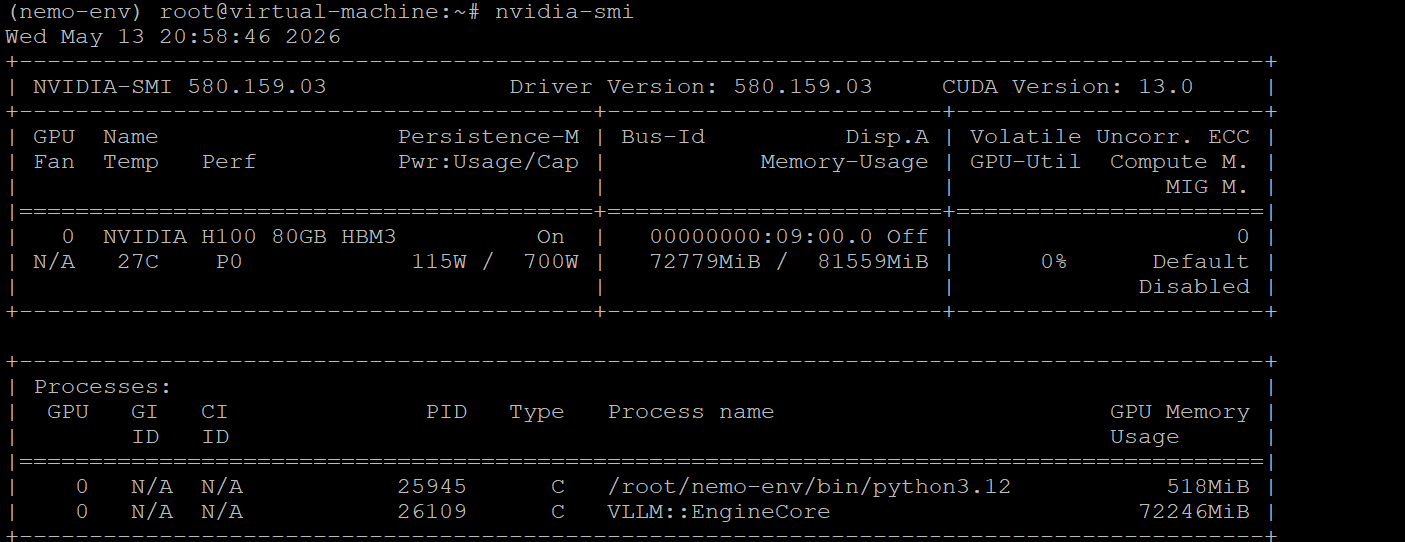
Here’s a snapshot of the GPU instance to show memory usage of about 72 GB VRAM
Step 5: Install Jupyter Notebook for ease of interaction
pip install notebook
jupyter notebook --allow-root --no-browser --ip=0.0.0.0
Initial Impressions of Nemotron Omni
Image Analysis
Python Code:
from openai import OpenAI
client = OpenAI(base_url="http://10.0.2.2:8000/v1", api_key="EMPTY")
MODEL = "nvidia/Nemotron-3-Nano-Omni-30B-A3B-Reasoning-FP8"
import base64

def image_to_data_url(path: str) -> str:
    with open(path, "rb") as f:
        b64 = base64.b64encode(f.read()).decode("utf-8")
    return f"data:image/jpeg;base64,{b64}"

image_url = image_to_data_url("/root/ticket-5442838_1280.jpg")

response = client.chat.completions.create(
    model=MODEL,
    messages=[
        {
            "role": "user",
            "content": [
                {"type": "text", "text": "Based on the information in this image, how much do 10 tickets cost?"},
                {"type": "image_url", "image_url": {"url": image_url}},
            ],
        }

    ],
    max_tokens=1024,
    temperature=0.2,
    extra_body={"top_k": 1, "chat_template_kwargs": {"enable_thinking": False}},
)
print(response.choices[0].message.content)Image:

Prompt: Based on the information in this image, how much do 10 tickets cost?
Response:

Video Understanding:
Python Code:
from openai import OpenAI
client = OpenAI(base_url="http://10.0.2.2:8000/v1", api_key="EMPTY")
MODEL = "nvidia/Nemotron-3-Nano-Omni-30B-A3B-Reasoning-FP8"

from pathlib import Path

video_url = Path("/root/Apollo_11_moonwalk").resolve().as_uri()
reasoning_budget = 16384
grace_period = 1024

response = client.chat.completions.create(
    model=MODEL,
    messages=[
        {
            "role": "user",
            "content": [
                {"type": "video_url", "video_url": {"url": video_url}},
                {"type": "text", "text": "Describe this video."},
            ],
        }
    ],
    max_tokens=20480,
    temperature=0.6,
    top_p=0.95,
    extra_body={
        "thinking_token_budget": reasoning_budget + grace_period,
        "chat_template_kwargs": {
            "enable_thinking": True,
            "reasoning_budget": reasoning_budget,
        },
        "mm_processor_kwargs": {"use_audio_in_video": False},
    },
)
print(response.choices[0].message.content)
Video: Apollo 11 Moonwalk
Prompt: Describe this video.
Response:

Prompt: What is being said in the video?
Switch the use_audio_in_video flag to True in the prompt
Response:

Audio Processing:
Python Code:
from openai import OpenAI
client = OpenAI(base_url="http://10.0.2.2:8000/v1", api_key="EMPTY")
MODEL = "nvidia/Nemotron-3-Nano-Omni-30B-A3B-Reasoning-FP8"

from pathlib import Path

audio_url = Path("/root/Gettysburg Recitation.mp3").resolve().as_uri()

response = client.chat.completions.create(
    model=MODEL,
    messages=[
        {
            "role": "user",
            "content": [
                {"type": "audio_url", "audio_url": {"url": audio_url}},
                {"type": "text", "text": "Transcribe this audio."},
            ],
        }
    ],
    max_tokens=1024,
    temperature=0.2,
    extra_body={"top_k": 1, "chat_template_kwargs": {"enable_thinking": False}},
)
print(response.choices[0].message.content)
Audio: Recitation of Gettysburg address
Prompt: Transcribe this audio.
Response:

What’s next for multimodal AI
The shift from multi-model pipelines to a unified multimodal endpoint changes the economics and reliability profile of enterprise AI at a structural level. A single endpoint that accepts video, audio, images, and text eliminates the orchestration layer that staggers these inputs through separate APIs, removes the intermediate text representations that cause cross-modal context loss, and concentrates the failure surface to one model rather than three or four. Teams that have spent engineering cycles on transcription error handling, vision-model version pinning, and cross-modal context serialization get that time back.
For agentic workloads specifically, the benefit is compounded. An agent that can perceive diverse inputs natively does not need a preprocessing layer to decide which information to surface, it receives the raw inputs and reasons over them directly. That shifts the design challenge from "how do I convert everything to text before the model sees it" to "what should the model actually do with what it perceives," which is a much more productive place to spend engineering attention.
The open-weights release of Nemotron 3 Nano Omni with BF16, FP8, and NVFP4 checkpoints means organizations can run these powerful models with full control and sovereignty.
Build hyperscale AI efficiently on Radiant
Whether you are building agentic workflows for enterprises or leveraging multimodal AI for superior performance, Radiant helps you get more out of every GPU, for every workload
- A full-fledged AI cloud to train, fine-tune, version, store and serve models.
- A wide variety of compute options to suit your needs: Bare-metal Clusters, Virtual Machines, Managed Kubernetes and Inference Endpoints
- Run open source models such as NVIDIA Nemotron, Qwen and DeepSeek in a fully sovereign environment
- Storage designed for multimodal workloads: High-performance block and object storage coupled tightly with the newest GPUs to ensure non-stop operation of media-intensive agents and workflows
- Our GPU clusters are designed for maximum utilization and high availability, so you can deploy enterprise AI economically and reliably.